
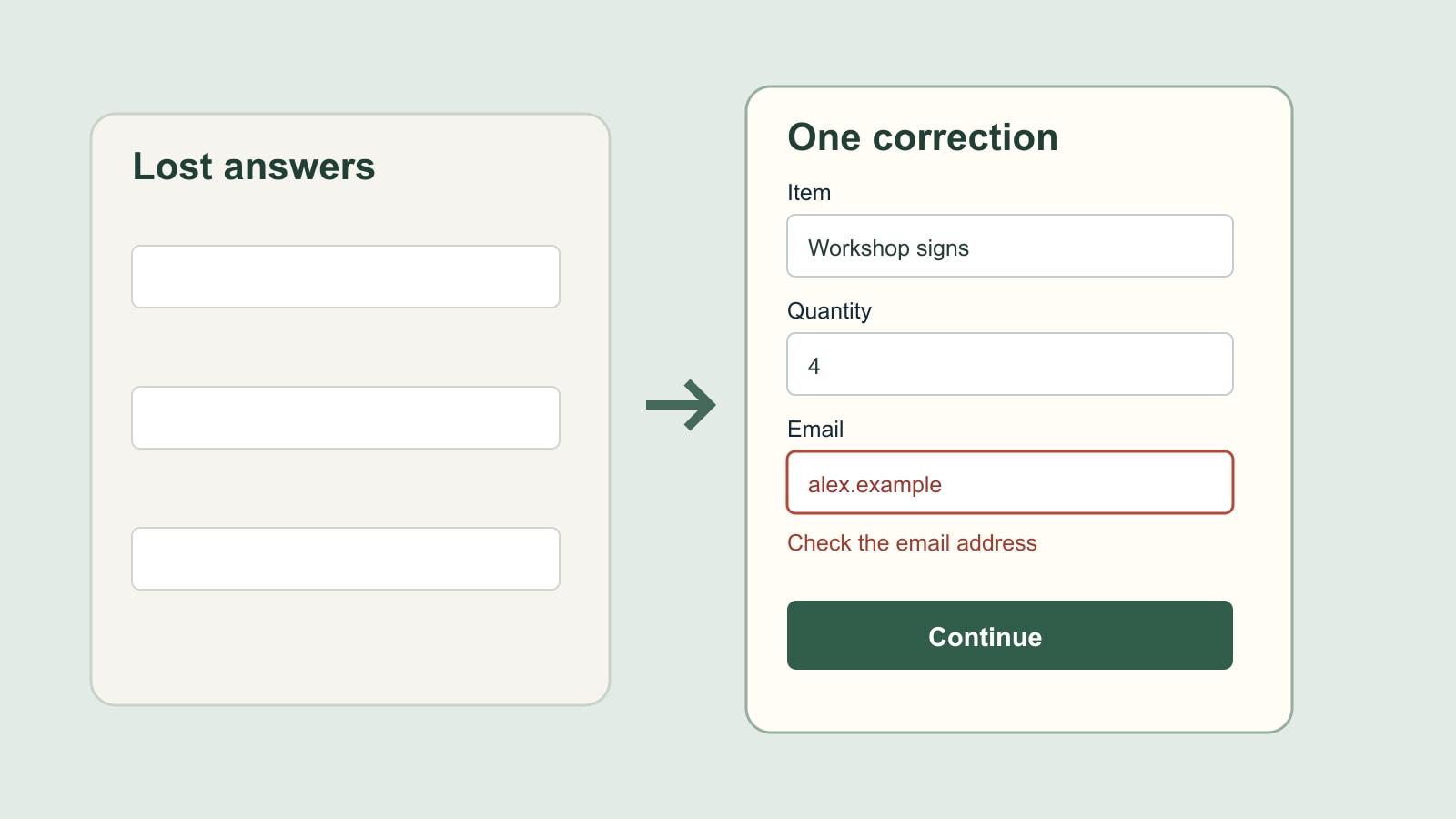
Imagine finishing a detailed enquiry form. You choose the item, enter a quantity, explain the deadline and write the question that took a moment to phrase. You press Send. An error appears beside your email address—and every other answer has disappeared.
This is a fictional example, not a report about a customer or a particular website. Its frustration is easy to locate. The form has found one thing to correct, but its response has created several new tasks. A useful recovery should help someone repair the answer that needs attention while keeping the work they have already done.
Correction is a different task from starting again
An initial form asks a person to supply information. A validation error asks them to revise information. Treating both states as the same empty page ignores that difference.
The original answers provide context. A person can see what they entered, compare it with the instruction and change the relevant part. Without them, even a perfectly worded error message can be difficult to act on. Someone may remember that they made a mistake but not remember the exact text the website rejected.
The practical question for a form review is therefore wider than “Did the red message appear?” Ask what happened to the person’s answers when it appeared. Recovery is a complete interaction, not an isolated line of copy.
Keep the answer that needs correcting as well
The GOV.UK Design System’s error-message guidance says to retain both passing and failing answers when presenting an error. That second part matters. Keeping only the answers judged valid can still remove the very text the person needs to inspect.
Take a fictional email entry, alex.example, in our enquiry. The recovery state should make it possible to examine and edit that entry alongside a helpful message. Silently replacing it with an empty box asks the person to infer what went wrong from memory.
Preserving an entry is not the same as accepting it as correct. A website can show the supplied answer, explain that it cannot yet use it and wait for a correction. Those three things belong together. The page is acknowledging the attempt while making its limitation clear.
There are implementation and privacy decisions behind how any real form handles data. This article does not prescribe indefinite browser storage or promise that sensitive fields should always be redisplayed. It concerns the recovery state of an ordinary enquiry form; the responsible developer must account for the fields and service involved.
Tell the person where to go next
A message beside a field helps once someone reaches it. On a long page, the person may also need a clear indication that the submission has not succeeded and a route to the relevant place.
W3C’s form-notification tutorial discusses overall feedback alongside feedback near individual controls. It explains how headings, page titles and error lists can communicate an outcome. These techniques help make the state understandable; a red outline alone is not a complete explanation.
For our fictional enquiry, an overall notice might identify the email problem, with a link to the email field. The field’s own message can then explain the correction. The wording should agree rather than making the person reconcile two different descriptions of one problem.
This is also something to try with a keyboard. Can someone discover that there is an error, reach the field and edit it without needing to hunt visually through the entire page? Passing one visual spot check does not establish that the complete recovery works for different ways of using the form.
Do not blame an answer for a service failure
A missing required answer, an invalid format and a service that cannot process a submission are different situations. They should not all lead to an instruction to change the person’s information.
The GOV.UK validation pattern separates validation from eligibility and service problems. It also recommends presenting entered fields again with appropriate notifications when validation fails. This is guidance for a particular government design system, not a claim that copying its components proves legal compliance for another website.
In our example, asking for a complete email address is useful if that is genuinely the problem. Repeating the same instruction during a service outage would send the person round in circles. If the service has failed, the page needs an honest account of that state and the available next step. It must not invent a successful submission either.
A notice saying the form could not be processed should therefore be reviewed against what actually happened. Did the website receive the information? Is there a reference? Is it safe to retry? Those answers depend on the implementation. The interface should not guess them to sound reassuring.
A short acceptance test using made-up information
You can discuss recovery with a developer without providing real customer details. Agree on a small fictional test case: a named item, a quantity, a short explanation and one deliberately incomplete email entry. Use a test environment or an agreed test route that will not send a genuine enquiry or create an order.
After submitting, inspect the whole state. The other answers should remain available as intended. The email entry should be visible for correction where appropriate. The page should identify what failed and offer a clear route to fix it. The person should not be told that the enquiry was sent successfully while still looking at an unresolved error.
Correct the email and continue through the agreed test. Check the resulting confirmation against what the system actually received. Keeping answers during an error and delivering the corrected submission are related requirements, but one does not prove the other.
Record the result in plain terms: which test data was used, what remained, which field changed and what the final confirmation demonstrated. “The error message works” is too broad if only the colour of the message was checked.
Include the recovery state in the website brief
When discussing a website or enquiry-form project, describe the unsuccessful route as well as the successful one. A brief can say: retain appropriate entered answers after a validation error, identify the correction clearly, make it reachable, and give an accurate final outcome.
That is more useful than asking for a form to be “user-friendly”. It describes a behaviour that can be checked. It also keeps the conversation focused on the visitor’s task: correcting one answer without reconstructing an entire enquiry.
The form does not need to pretend nobody will make a mistake. It needs to make a mistake recoverable. Finding one error should be the beginning of a small correction, not the destruction of everything that was already right.
Sources: GOV.UK Design System validation and error-message guidance, and W3C’s form-notification tutorial, linked beside the relevant explanations. All enquiry details in this article are fictional. No conversion uplift, customer test or legal-compliance outcome is claimed.