
An editable design shows a neat rectangle of artwork. When someone adjusts the frame, part of a shape appears beyond what you thought was the edge of the picture. It may have been hidden rather than removed.
In Illustrator, a clipping mask can control the visible area while leaving its contents available for editing. Before requesting a new crop, establish whether you want the frame changed or the artwork moved within it.
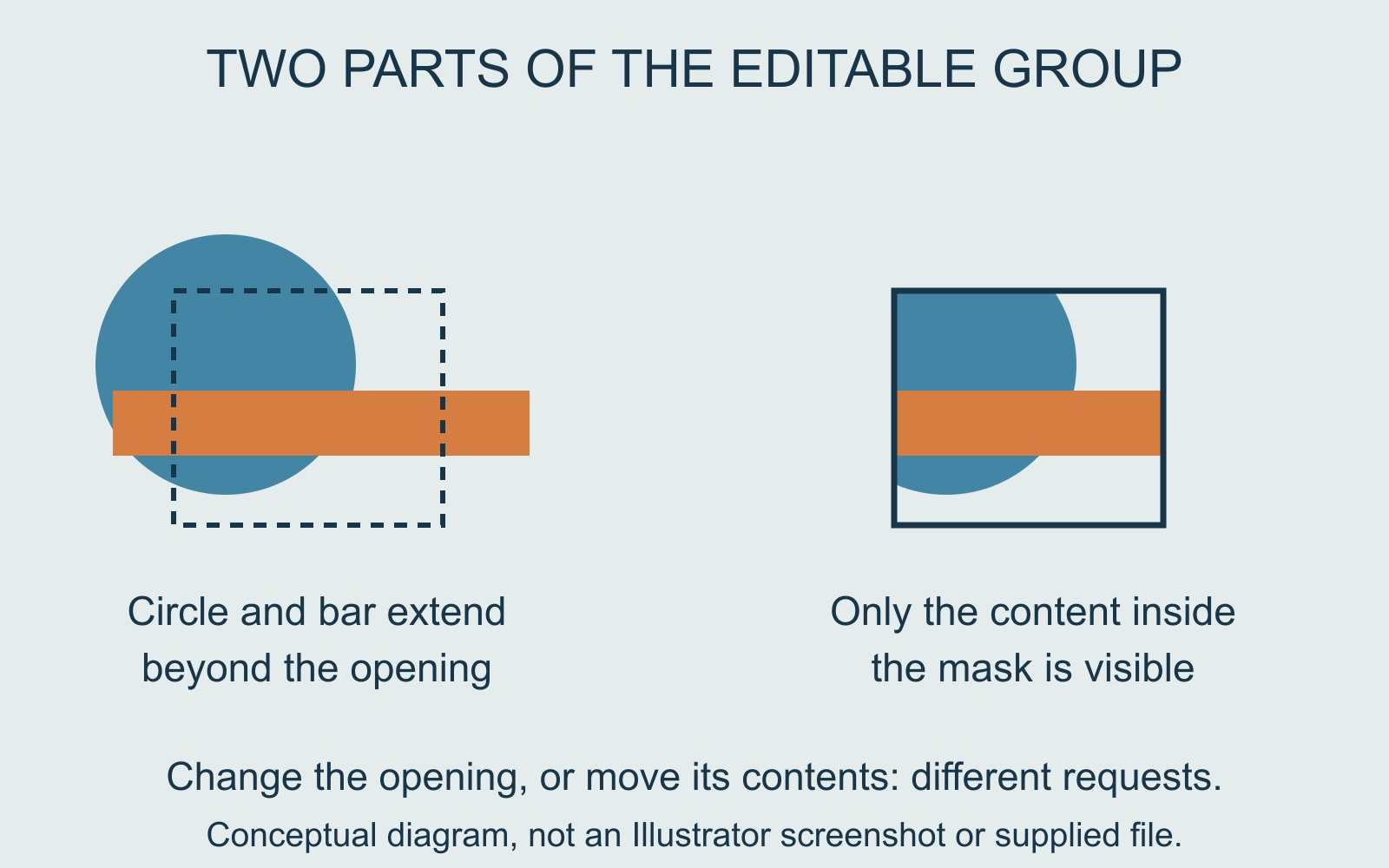
The mask and its contents have different jobs
Adobe's clipping-mask tutorial describes a vector shape placed above other content. Once used as a mask, its boundary hides the parts outside it. The mask and masked contents form a clip group; the underlying artwork remains.
Imagine an original illustration made from a blue circle and an orange bar. A rectangular mask reveals only their middle portions. The visible result can look like a rectangular piece of artwork, even though the circle and bar extend farther in the editable group.
Our diagram uses those simple shapes to explain the relationship. It is not a screenshot of Illustrator or evidence that a particular supplied file contains recoverable artwork.
Ask which part needs to move
Adobe shows separate Edit Clipping Path and Edit Contents controls, as well as selecting the components in isolation mode. That distinction matters when explaining a revision.
“Move the blue circle left inside the existing frame” asks for a different change from “make the visible frame wider”. In the first request, the opening stays put. In the second, its boundary changes and can reveal a different portion of the contents.
Send the intended appearance with the instruction. A rough annotated preview can identify the part you want retained without replacing the editable master. If the revised composition exposes an unwanted element, resolve that in the proof before approval.
Hidden content is not a promise of missing detail
A mask is useful when the underlying artwork is present. It cannot be treated as evidence that the creator has supplied more image beyond the visible edge. Ask the file owner what is actually available.
Do not assume an exported preview preserves the original editing structure, or that widening a mask can recreate absent picture detail. Keep the editable source separate from the output being reviewed.
Hand over both the file's role and the intended view
For a printing enquiry involving editable artwork, identify the design master and the proof showing the accepted composition. Explain any crop revision before treating an exported file as final.
A useful handover lets the recipient distinguish what should be visible from what may remain available to edit. Those are connected decisions, not interchangeable descriptions of the file.
Source: Adobe's clipping-mask tutorial, linked above. Shapes and revision examples are original illustrations; no customer file or software session was tested.