
You ask for a correction on page 1. The designer opens the cover, while you are looking at the first page of the main text. Both of you may be describing the file accurately, using different identifiers.
Before moving pages or changing the artwork, separate three things: a page's position in the PDF, its navigation label and any number visibly printed on it.
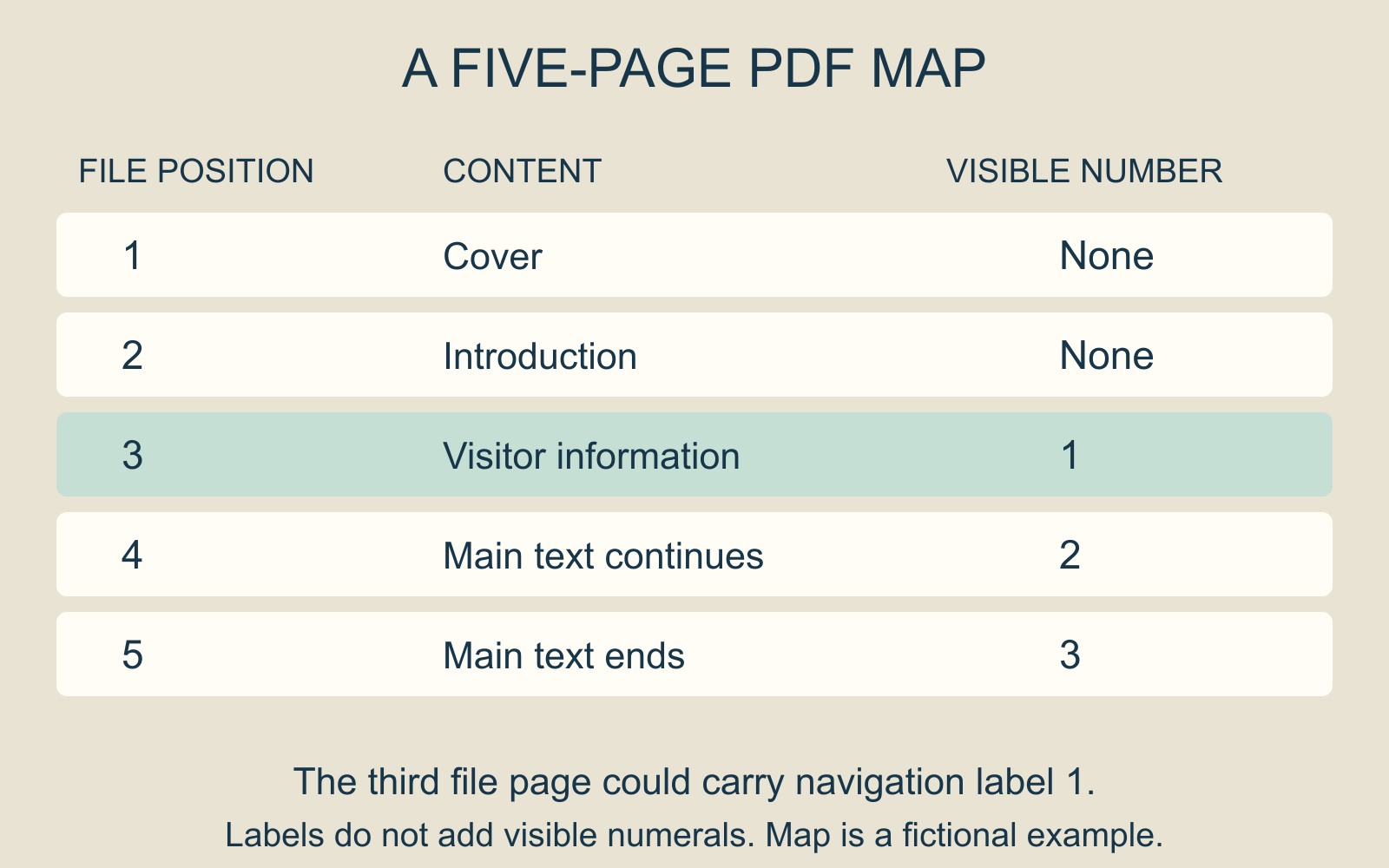
One page can have three identifiers
In a fictional five-page information pack, the first PDF page is a cover, the second is an introduction, and the third begins the main text with a visible number 1. The fourth and fifth pages display 2 and 3.
Here, “third page in the file” and “the page printed with 1” identify the same page. Neither description means there are three physical sheets: single-sided or double-sided output is a separate decision.
A navigation label adds another identifier. Adobe's Acrobat page-label guide explains that thumbnail and toolbar numbering can differ from the numbers printed in the document. Labels can use different numbering styles, starting values and prefixes.
Changing a label does not print a new number
Acrobat's Page labels tool changes navigation labels, not the visible page artwork. Adobe directs users to its Header and footer tool to add visible page numbers.
For our example, a navigation label of 1 could identify the third file page, matching its visible numeral. That would help describe the reading sequence without removing the cover or introduction. It would not write a missing numeral onto either page.
Equally, adding a visible 1 in the layout would not, by itself, establish how the PDF viewer labels that page. Check the file in the intended viewing application rather than assuming every viewer presents the same controls.
Give a correction a second point of reference
Instead of “change page 1”, write: “Third PDF page, headed Visitor information, showing printed page number 1: replace the arrival time.” The heading is fictional, but the instruction format is useful.
Name the file version too. If somebody inserts another introductory page, the ordinal position changes even if the heading and printed number stay the same. Reconfirm the location in the revised proof rather than carrying an old page reference forward unquestioned.
Describe the print selection separately
When discussing document printing and binding, say whether the cover and introduction are included and identify the required range unambiguously. Include copies and single- or double-sided requirements separately.
The useful question is which actual pages should be supplied or changed. Renumbering is appropriate only when it solves the identified problem.
Source: Adobe Acrobat's page-label guidance, linked above. The five-page map is an explanatory example, not a processed customer document.