
A report ends one chapter, leaves a blank page, then starts the next. Before deleting that page from the PDF, ask whether the source document is deliberately starting its new section on an odd-numbered page.
A blank can be part of a layout rule. It can also be unwanted. Its appearance alone does not tell you which decision the author made.
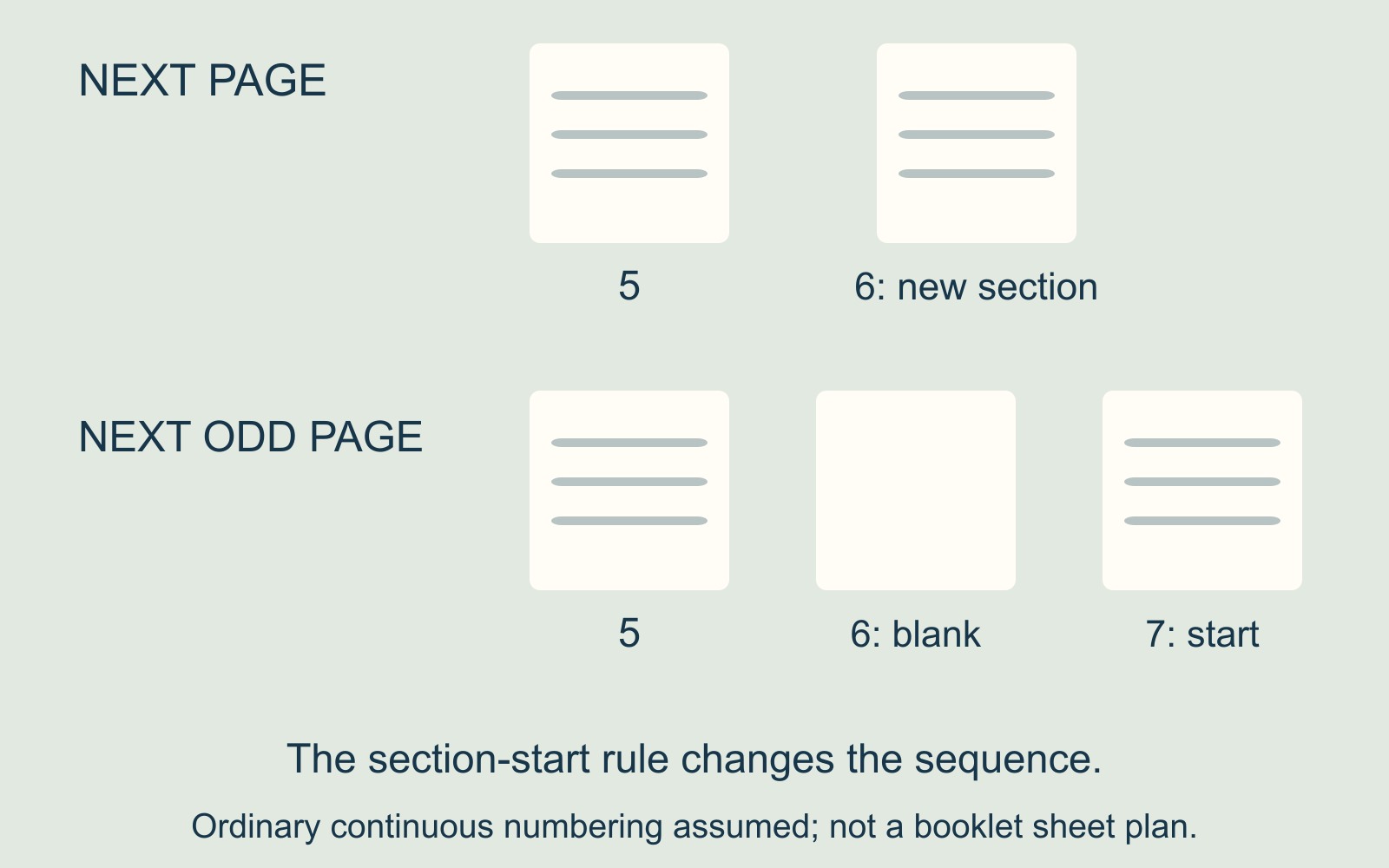
Next page and next odd page are different instructions
Microsoft's Word section-break guide distinguishes Next Page from Odd Page and Even Page. Next Page starts a section on the following page; the other choices start it on the next page of the specified parity.
Take a hypothetical document with ordinary continuous numbering. A chapter ends on page 5. A next-page start would place the following section on page 6. A next-odd-page start takes it to page 7, leaving page 6 between them.
The numbers describe this example's sequence. They are not a rule for every document's visible numbering, cover arrangement or printer-sheet layout.
Find the rule before removing the result
Microsoft's blank-page guidance identifies section breaks as a possible cause and suggests Draft view to help find them. It also distinguishes manual page breaks, which tell Word where to begin a new page.
Ask the author to identify the break before the next chapter. Is the chapter intended to begin on the next available page, or on a particular odd or even page? That is a document-design decision rather than a command to remove every blank.
If the blank is intentional, record it in the page plan. If it is unwanted, request a revised source and output that follow the agreed sequence.
A section break also has a formatting role
Microsoft lists orientation, headers and footers, numbering and columns among formatting that sections can support. Its blank-page guidance notes that deleting section breaks in the middle of a document can cause formatting problems.
Do not treat a break as a spare empty paragraph. A change that closes the gap but alters the next section's layout has not necessarily solved the job.
Keep the original, identify the intended start and inspect the revised section as well as the page count. The aim is the correct sequence with the intended formatting.
Confirm which blanks belong in the supplied file
For document printing and binding, identify intentional blank pages, the complete page count and the required output. A Word section-start rule is separate from arranging folded sheets for booklet production.
Approve the version that reflects the agreed plan. “There is a blank page” is an observation; whether it belongs there depends on what that page is doing.
Sources: Microsoft's section-break and blank-page guidance, linked above. The numbered sequence is illustrative; no Word file or printed document was tested.