Two labels can both measure 60 by 40 millimetres and still have different outlines. One keeps almost square corners. The other curves into them. If the artwork was built tightly around the first shape, the second can remove the very space where a small detail was meant to sit.
The missing measurement is the corner radius. It describes a part of the cut shape, rather than the width of the label or the size of its printed image.
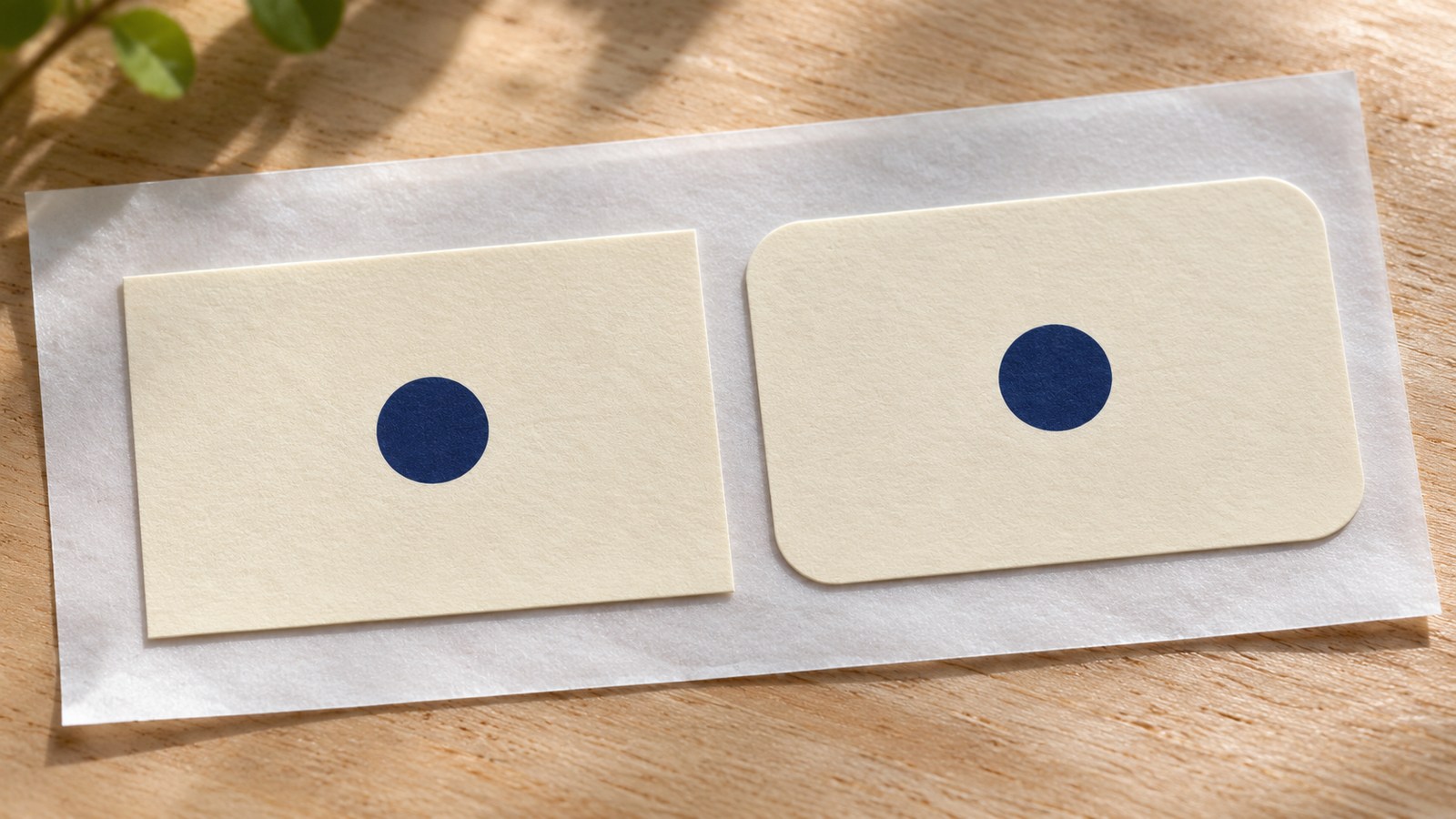
Width and height leave part of the shape unspecified
Label Planet defines corner radius through the circle that would be formed if the curved corner were extended. A larger radius makes a more rounded corner; a smaller one approaches the sharper appearance of a square corner.
Imagine two fictional labels with identical outer dimensions. Give one a gentle curve and the other a much larger curve. The centre can be unchanged while the available space near each corner changes visibly.
That is why “same size as last time” can be an incomplete instruction. It may identify the bounding rectangle without identifying the outline inside it. The drawing, cutter template or exact product reference resolves that ambiguity more usefully than a description such as “slightly rounded”.
Compare the cut outline with the artwork
Start with the intended finished outline. Place it over the proposed artwork at actual size. Then look at the corner details: a border turning the corner, a small line of text, a symbol or a decorative flourish.
A border is particularly revealing. A rectangular border with sharp internal corners may look uneven inside a strongly rounded label even if no part is physically cut away. That is a layout question as well as a production question.
Do not solve every problem by shrinking the complete design. It may be better to move a small detail inward or reshape the border. The central logo may already be the right size. Change the element that conflicts with the outline, then check the complete arrangement again.
This is a proposed proofing exercise, not a report of a test on a customer order. Its purpose is to make an otherwise vague instruction visible before production.
The gaps on the sheet are a separate check
A rounded corner does not tell you everything about the sheet that carries it. Label Planet's description of rounded-corner rectangles notes that these labels tend to have surrounding waste material, which can help keep them away from a sheet's unprintable margins. That is a reason to inspect the complete sheet layout, rather than assume every rounded rectangle is supplied in the same way.
The surrounding material is often called the selvedge. The specific layout still needs checking: margins, gaps, number of labels and product code. Do not treat a similar-looking rounded rectangle as proof that two sheets use the same template.
Nor should the corner shape be used to infer printer compatibility, adhesive strength or suitability for a curved container. Those are separate specifications. Rounding an outline is not evidence that a label will stay attached in a particular environment.
Keep the final shape and the preview distinct
A printed background may extend beyond the final cut. Avery's explanation of round labels appearing square in a print PDF shows why the preview's coloured area is not always the finished label outline.
For a corner check, ask which line identifies the actual cut. A rectangular image area, the PDF page edge and the label's finished edge can be different things. Do not redraw the label merely because the background extends beyond its curve.
A useful approval record is more precise than “rounded”
Keep the exact label reference or agreed cutting outline alongside the artwork version. Record the finished width and height, corner shape or radius where specified, and the supply format. Include a proof showing the artwork against the cut outline rather than only a floating design.
If a replacement is proposed later, compare those details before reusing the artwork. A change to the outline can be small enough to escape a quick glance and large enough to affect the design.
For a custom label or sticker enquiry, the useful starting point is that outline together with the intended surface and finished size. Any particular production specification still needs to be confirmed for the job.
The practical distinction is simple: width and height describe the space the label occupies. The corner tells you which parts of that space are actually there.
Sources and scope
The linked supplier definitions and product guidance support the geometry, example sheet layouts and preview distinction. The fictional comparison and approval record are editorial guidance. No universal corner radius, print tolerance, adhesive result or tested Time for Designs product is asserted.